


Imagine a potential customer lands on your website and is all set to buy. But have one quick question before they complete the checkout. Instead of a simple chat, they find a long and boring contact form. People no longer wait for an email reply; they just leave.
They now want an instant answer. This is where WhatsApp comes with 3.3 billion active users and 98% open rate. So why make them work hard to reach you? Simply embed WhatsApp chat on a WordPress website by generating a code for FREE using Getgabs. It is 100% free, no credit card required.
WhatsApp Chat lets your customers connect with you in a single click, build trust, and help close deals faster. In this guide, you will learn how to add a WhatsApp chat to your WordPress site in a few minutes to help you grow.
What is a WhatsApp Chat Widget?
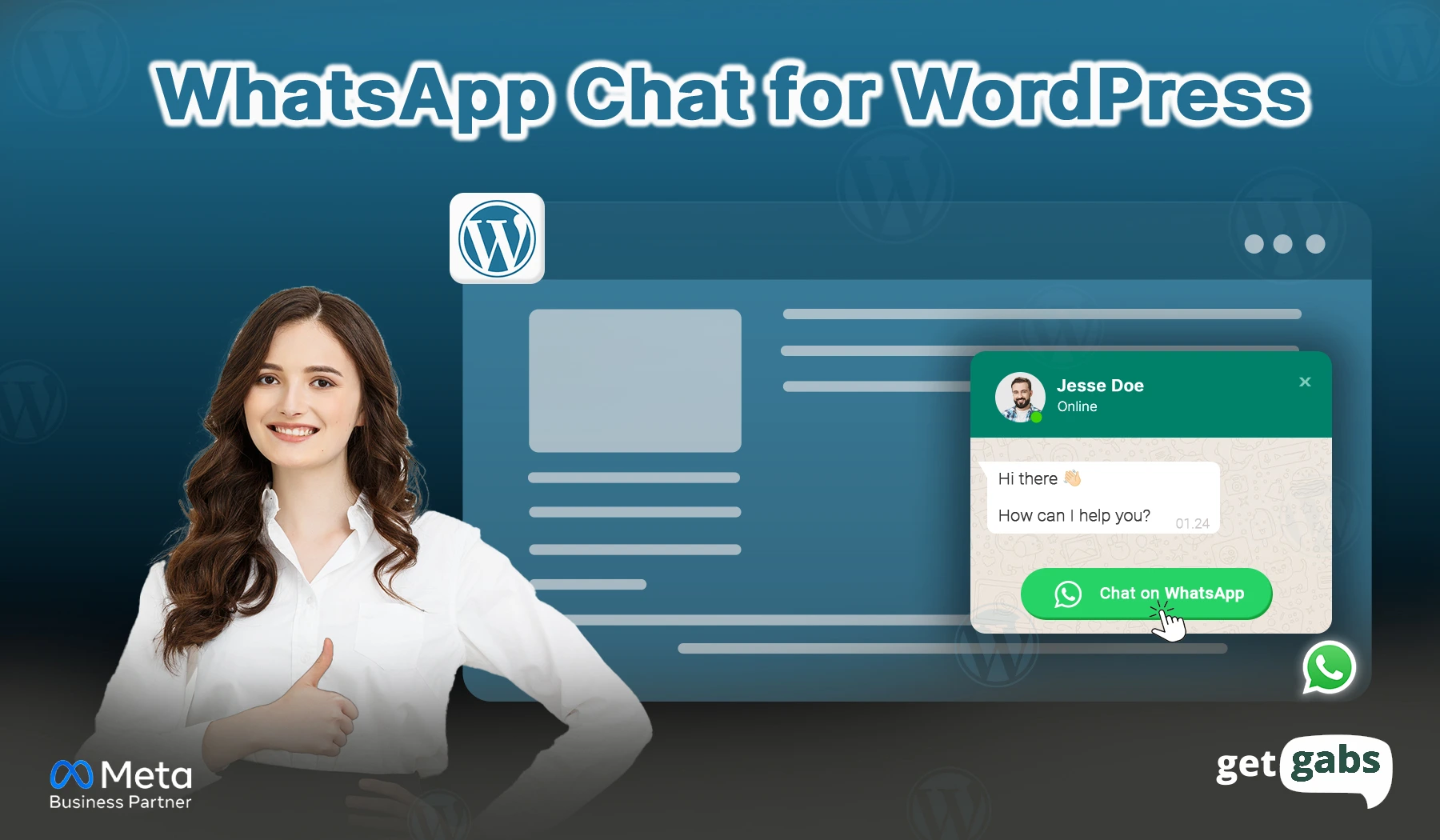
A WhatsApp Chat widget is a small floating button or pop-up that sits in the corner of your website. When visitors tap on it, it directly opens a WhatsApp chat to start a conversation. Rather than copying a number or filling out a “Contact us” form, they can message you while still browsing your page. No download. No long forms. Just one click, and the stage is ready to connect.
It is the quickest way to turn your random visitor into a satisfied customer. Depending on how you set it up, your WhatsApp integration on a website can appear in different ways:
- Floating button that stays visible across pages.
- An embedded widget that encourages users to start a chat.
- A multi-agent support point that directs the conversation to the appropriate team.
- Click-to-chat link that opens a WhatsApp chat immediately.
Why Add a WhatsApp Chat to Your WordPress Site?
In a simple one line, because your visitors are already on WhatsApp. Connecting them there just makes sense.
1. Visitors Trust WhatsApp More Than Contact Forms
No one likes filling out the long forms because they are time-consuming and impersonal. WhatsApp is more intimate since it is the same application through which individuals converse with their friends and relatives. When they see the familiar green icon on your site, they feel ready to talk. No inbox delaying, but just instant conversation.
2. Boosts Lead Generation and Sales
Customers who engage in a chat with companies have a 3 times higher chance of making purchases. Regardless of whether it is an online store or a service company, the WhatsApp chat button transforms online shoppers into clients.
3. Improves Customer Support Quality
Instant replies make the customer happy. When they get answers in minutes instead of hours, they are more likely to trust the brand while turning stressful questions into a simple chat, even outside business hours.
Step-by-step guide to add WhatsApp chat on WordPress Websites :
Step 1: Visit the WhatsApp widget generator tool page.
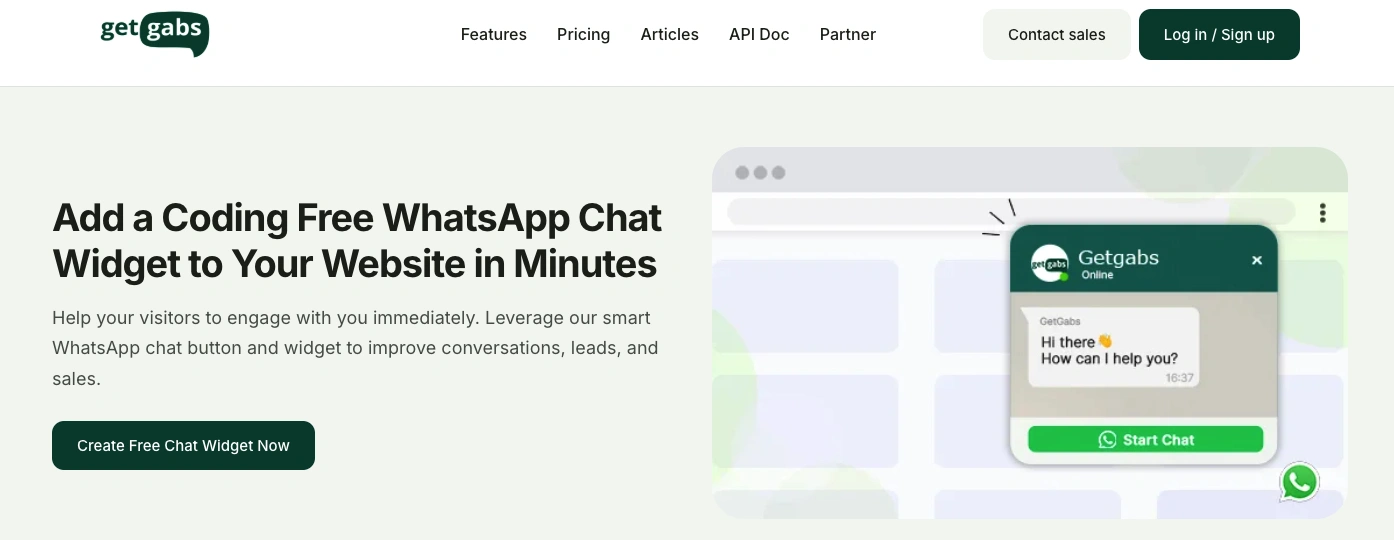
Step 2: Click on “Create Free Chat Widget Now” and update the details in the form. The preview on the right side helps you to submit the details accordingly.
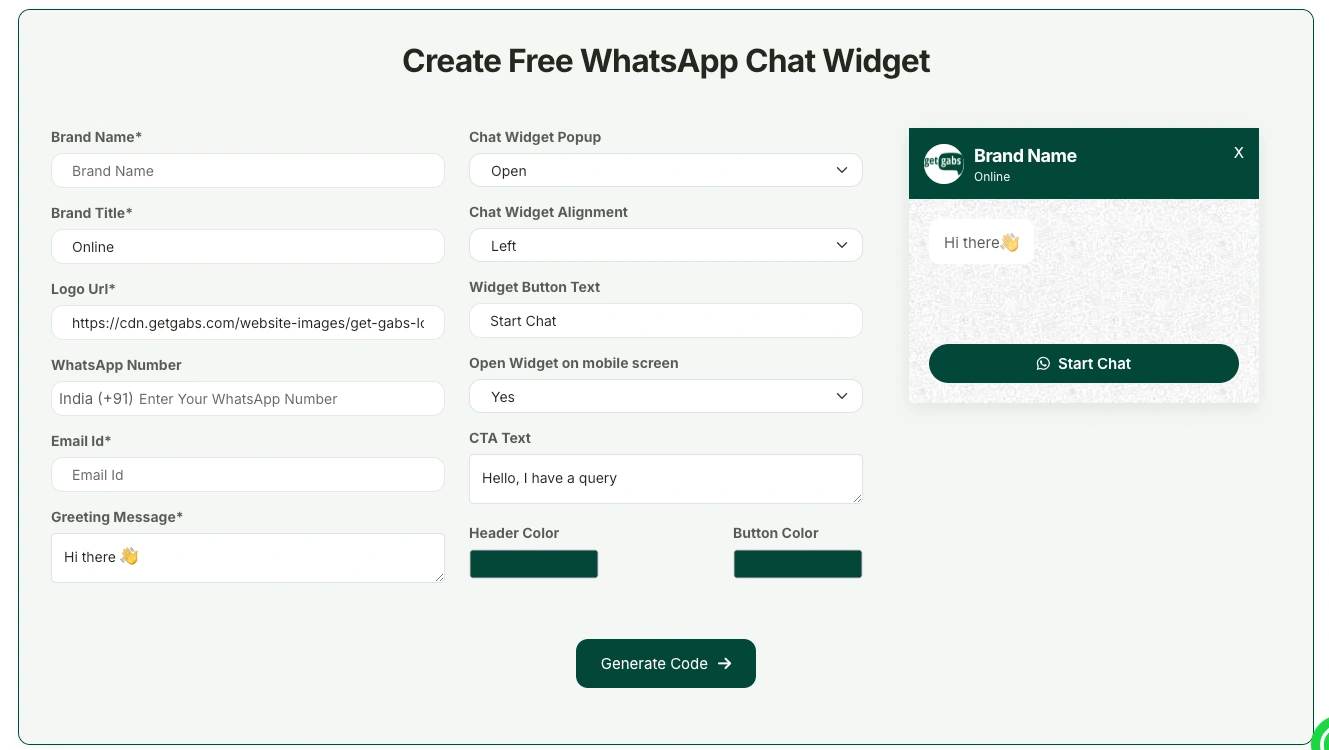
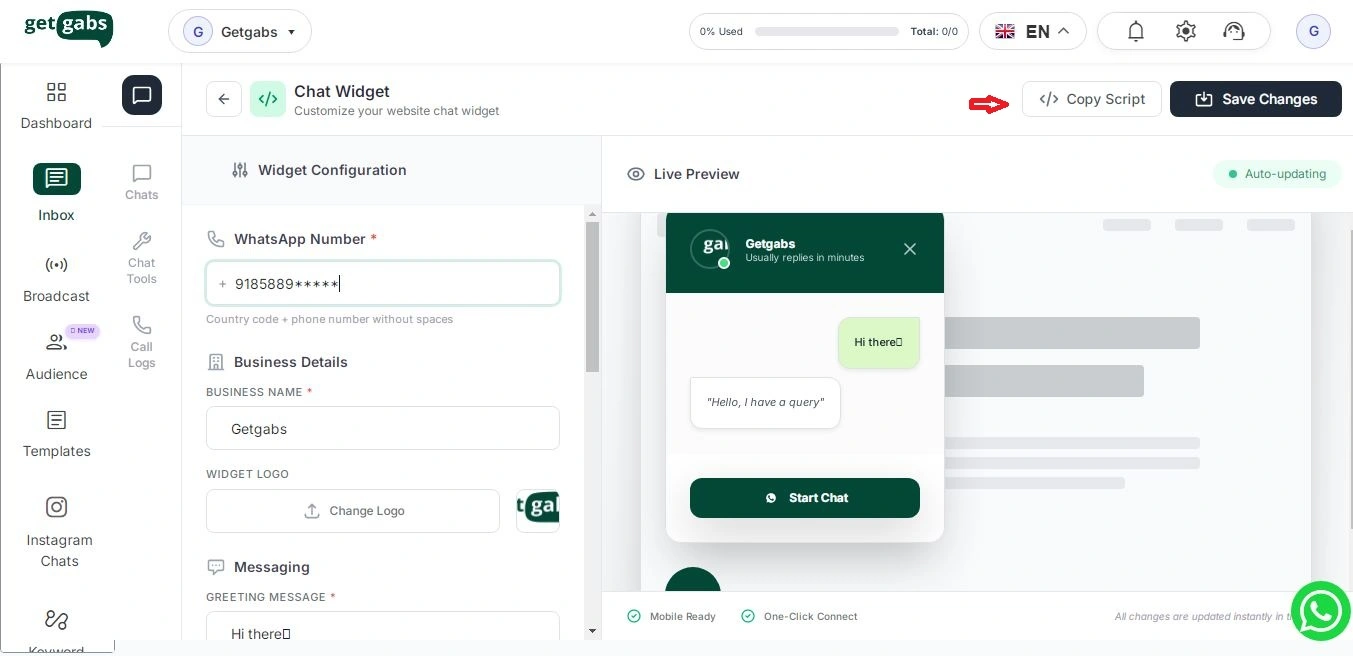
Step 3: Once all the details are filled, click on “Generate Code” and copy the Script Code
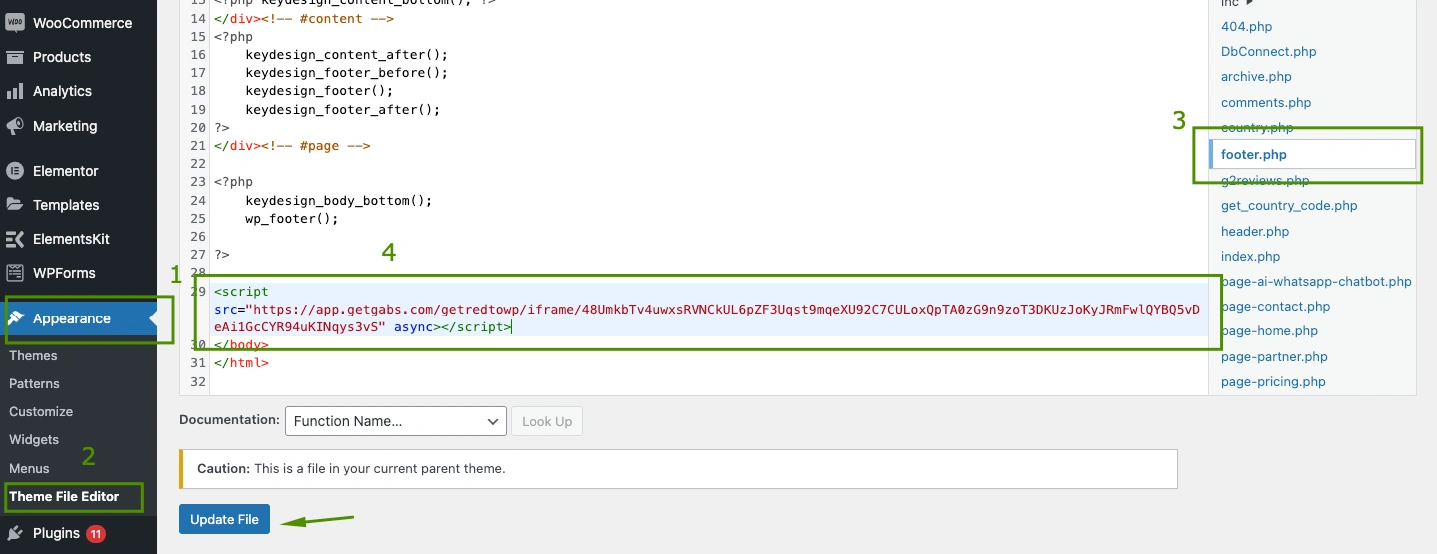
Step 4: Go to your WordPress Panel and click on Appearance >> Theme File Editor >> Footer.php to paste the Code.
Get ready to leverage the power of WhatsApp. If you need a chatbot for automatic response, please contact our team.
WhatsApp Chat Widget vs Traditional Live Chat: A Simple Comparison
Not sure between the WhatsApp chat widget or a regular Live Chat application? Although both assist you in communication with customers, a WhatsApp widget is typically more useful to businesses. Here’s side-by-side comparison:
| Feature / Benefit | WhatsApp Chat Widget | Live Chat Tools |
| Response Time | Instant, real-time | Depends on agent availability |
| Setup Time | 2–3 minutes | 1–2 hours+ |
| Automation | Yes (auto-replies) | Advanced (paid) |
| Lead Capture | Auto saves number | Usually requires form submission |
| Follow-ups | Easy reminders, templates | Limited unless integrated with CRM |
| Cost | Free | Often charged per seat |
| User Convenience | Very high (everyone uses WhatsApp) | Medium |
| Re-engagement | Possible anytime | Not possible once chat closes |
| Save Chat History | Yes (inside WhatsApp) | Usually no |
| Ease of Use | Very simple | Needs training |
| Requires Team Online? | No | Yes |
Best Use Cases for Embedding a WhatsApp Button on Your WordPress Website
A WhatsApp button works best when a customer has a query in their mind that is stopping them from buying. Here’s how different businesses can use it:
- Offer ecommerce support on product pages: Instant answer to questions regarding sizing, shipping, and returns right on the product page. It reduces cart abandonment.
- Automate lead capture for service businesses: Enables new leads to ask about pricing or features the moment they are interested.
- Strengthen your customer support team: Help visitors resolve their queries or clarify product details without making them wait or fill out a long ticket.
- Handle real estate queries efficiently: Share property pictures, book home tours, and connect with buyers with a slow back-and-forth of email.
- Streamline travel bookings and quotes: Confirm availability, collect requirements, and decrease back-and-forth for flights and hotels.
Conclusion
Adding a WhatsApp chat widget to your WordPress site is the easiest and most effective way to grow your business. By replacing slow and boring contact forms, you can help connect with customers on the app they already use and trust in their daily life. In simple terms, removing the friction that stops them from completing their purchase. From booking an appointment to selling products, a one-tap floating button on your site can help you close a deal much faster.
The Getgabs WhatsApp click-to-chat button is the best choice for your brand. Why? Because it’s lightweight, takes just a few minutes to set up, and scales with you. Plus, you can easily upgrade to powerful AI chatbots or a shared team inbox to handle more leads. Set to turn your website visitors into WhatsApp conversions? If yes, then create your free Getgabs Chat widget today, and that too without any credit card needed.
Related:
Embed WhatsApp Chat on a Shopify Website