Integrate WhatsApp with Wortal CRM to centralize messaging, improve response times, and deliver exceptional customer experiences from a single place.

 GIVA
GIVA 
 MultiFit
 quelton
 Ravenwood
 University of Southampton
 SML Mahindra
 Think IAS
 Ayurvedic Village
 dobbe.ai
 Vegetrainian
 HexaCoder
 Charity Commission
 Blissify
 Sansacosmetics
 Shine&Smooth
 shop.teamsg
 SOStravel
 Three Monkey
 Totpro
 TrendyBay
 tumbledry
 Vivekananda Global University
 Tumble Dry
GIVA
MultiFit
quelton
Ravenwood
University of Southampton
SML Mahindra
Think IAS
Ayurvedic Village
dobbe.ai
Vegetrainian
HexaCoder
Charity Commission
Blissify
Sansacosmetics
Shine&Smooth
shop.teamsg
SOStravel
Three Monkey
Totpro
TrendyBay
tumbledry
Vivekananda Global University
Tumble Dry
Tumble Dry
GIVA
MultiFit
quelton
Ravenwood
University of Southampton
SML Mahindra
Think IAS
Ayurvedic Village
dobbe.ai
Vegetrainian
HexaCoder
Charity Commission
Blissify
Sansacosmetics
Shine&Smooth
shop.teamsg
SOStravel
Three Monkey
Totpro
TrendyBay
tumbledry
Vivekananda Global University
Tumble Dry
 Salgar Tea
 FADE MMA & Gym
 10 Hydrogen
 Davgrey
 Voice AI Agency
 Ollic ict hub
 i-jobs
 American Language Centre
 Abroad Routes
 Arriival
 tagshop AI
 Dreamcast
 TIE Global
 Omni Ice Cream
 Alagasco
 Northern Spices
 Startup Chaupal
 Curious Hues
 Satyam AI
 GD Goenka School
 Capgemini
 Arte hair studio
 99pandit
Salgar Tea
FADE MMA & Gym
10 Hydrogen
Davgrey
Voice AI Agency
Ollic ict hub
i-jobs
American Language Centre
Abroad Routes
Arriival
tagshop AI
Dreamcast
TIE Global
Omni Ice Cream
Alagasco
Northern Spices
Startup Chaupal
Curious Hues
Satyam AI
GD Goenka School
Capgemini
Arte hair studio
99pandit
99pandit
Salgar Tea
FADE MMA & Gym
10 Hydrogen
Davgrey
Voice AI Agency
Ollic ict hub
i-jobs
American Language Centre
Abroad Routes
Arriival
tagshop AI
Dreamcast
TIE Global
Omni Ice Cream
Alagasco
Northern Spices
Startup Chaupal
Curious Hues
Satyam AI
GD Goenka School
Capgemini
Arte hair studio
99pandit
WhatsApp Wortal Integration is the process of connecting the WhatsApp Business API with Wortal CRM. This integration connects your CRM platform directly to WhatsApp, allowing your sales and support teams to communicate with customers.
Handle all WhatsApp chats using your Wortal CRM dashboard. View, reply to, and monitor customer conversations alongside full CRM data without switching to multiple apps.
Instantly reply to your customers' inquiries with WhatsApp messages showing directly in Wortal. Set up automated replies for common questions to decrease response time and boost satisfaction.
Use CRM data to send targeted WhatsApp broadcast messages to certain customer groups. Share promotions, announce new launches, or send follow-ups based on their past purchases or lead status.
Assign WhatsApp conversations to precise team members and add internal notes. Collaborate on customer inquiries without leaving the CRM, ideal for support teams and coordinating sales.
Log in to your Wortal account with your credentials and pick the business you want to integrate with WhatsApp Business.
Enquiry Now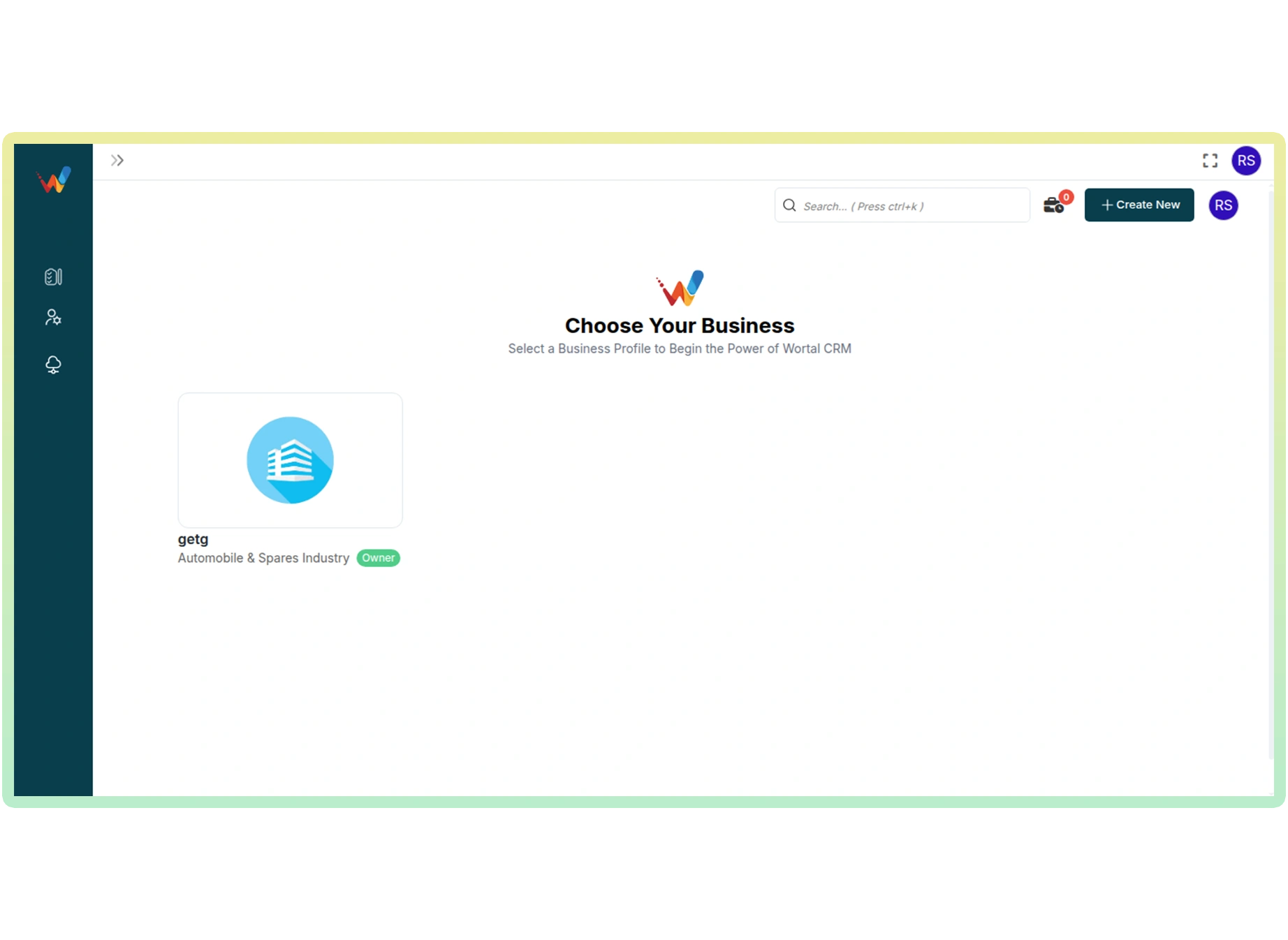
After logging in, you will automatically be redirected to your Wortal CRM dashboard. Here you can manage all your integrations and business settings.
Enquiry Now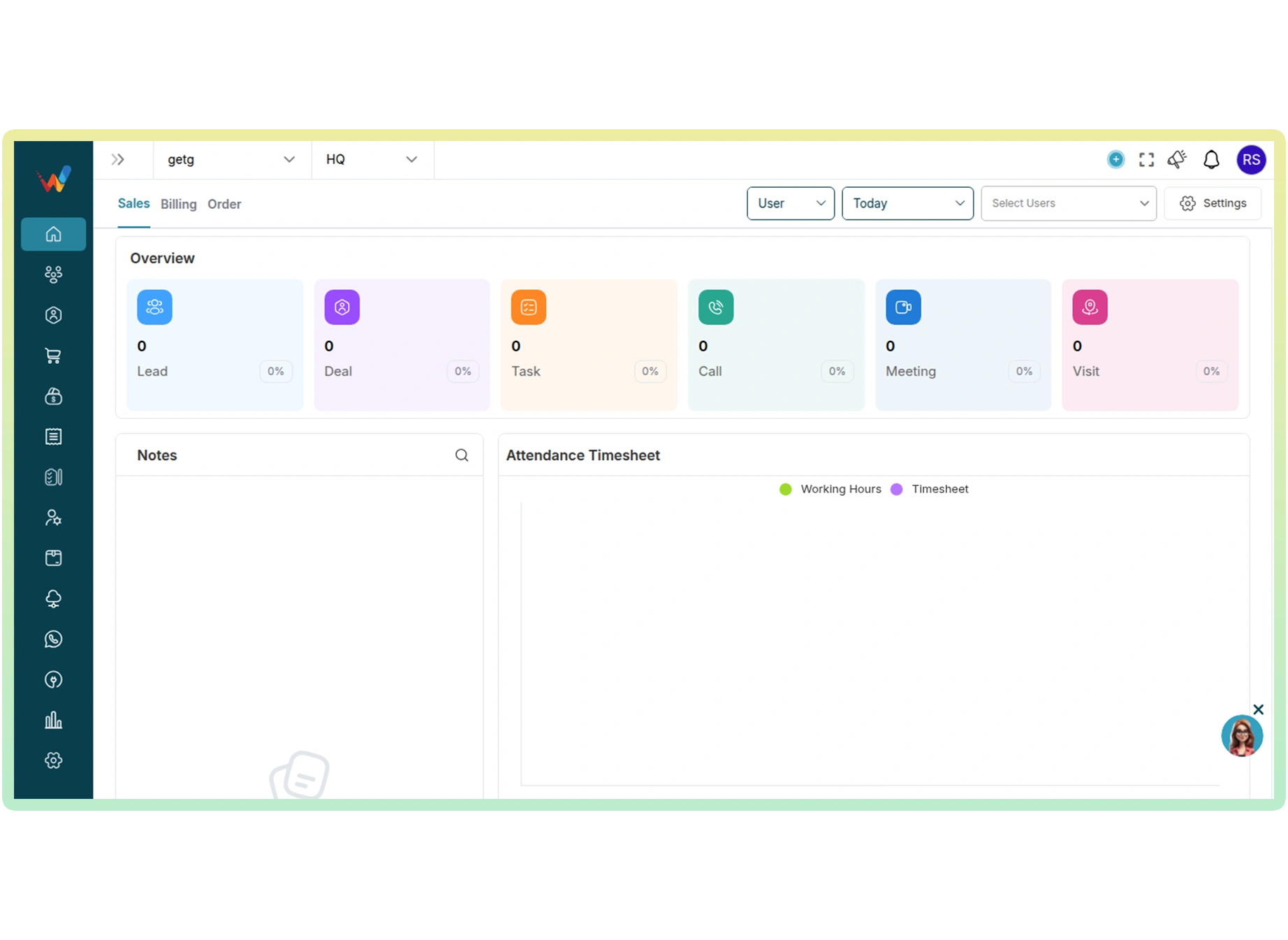
Go to the App Store from the left menu panel, search for "Getgabs" and tap to access the integration.
Enquiry Now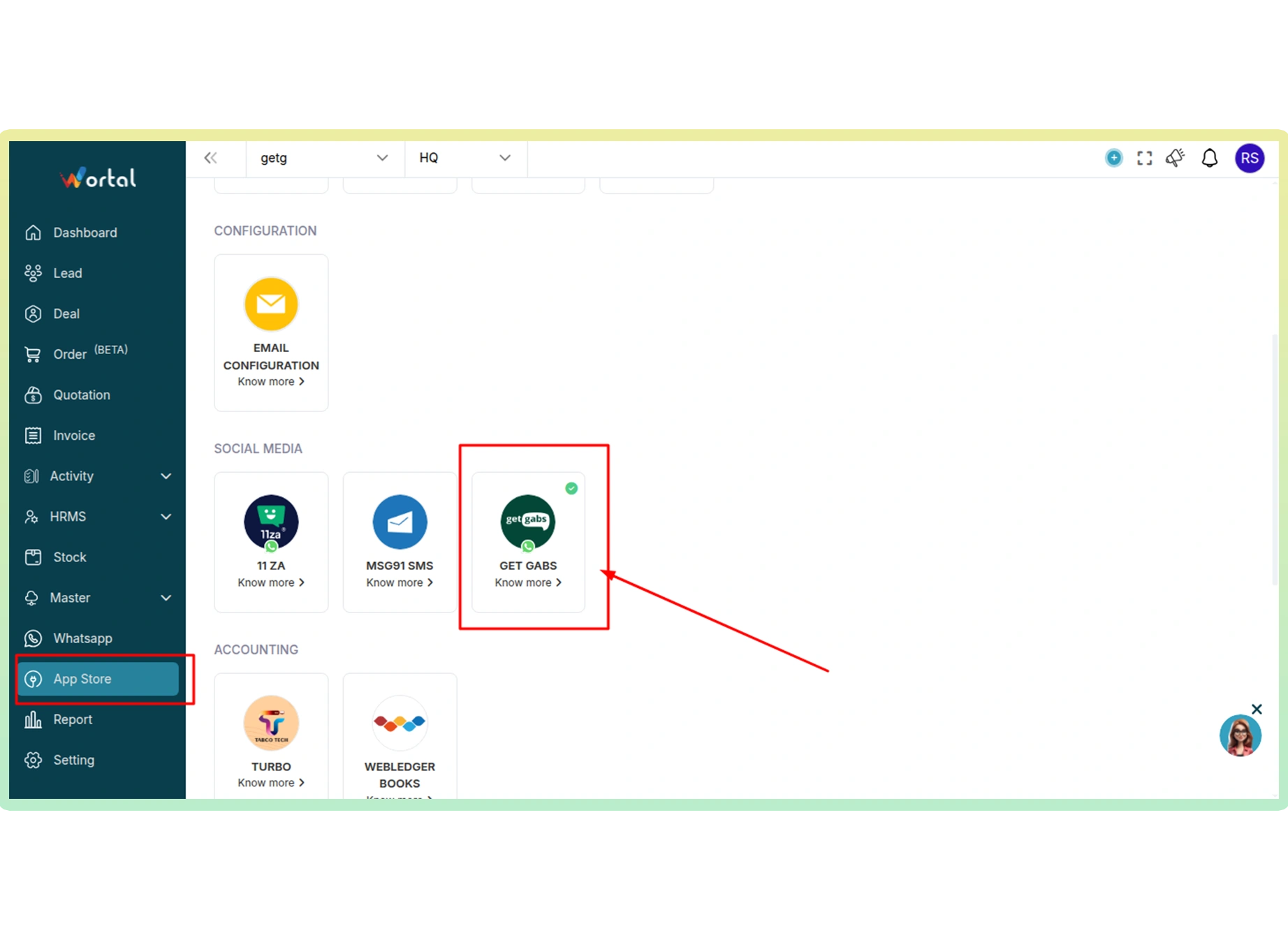
Click on the "Connect" button to easily link your Wortal CRM with Getgabs for WhatsApp Business integration.
Enquiry Now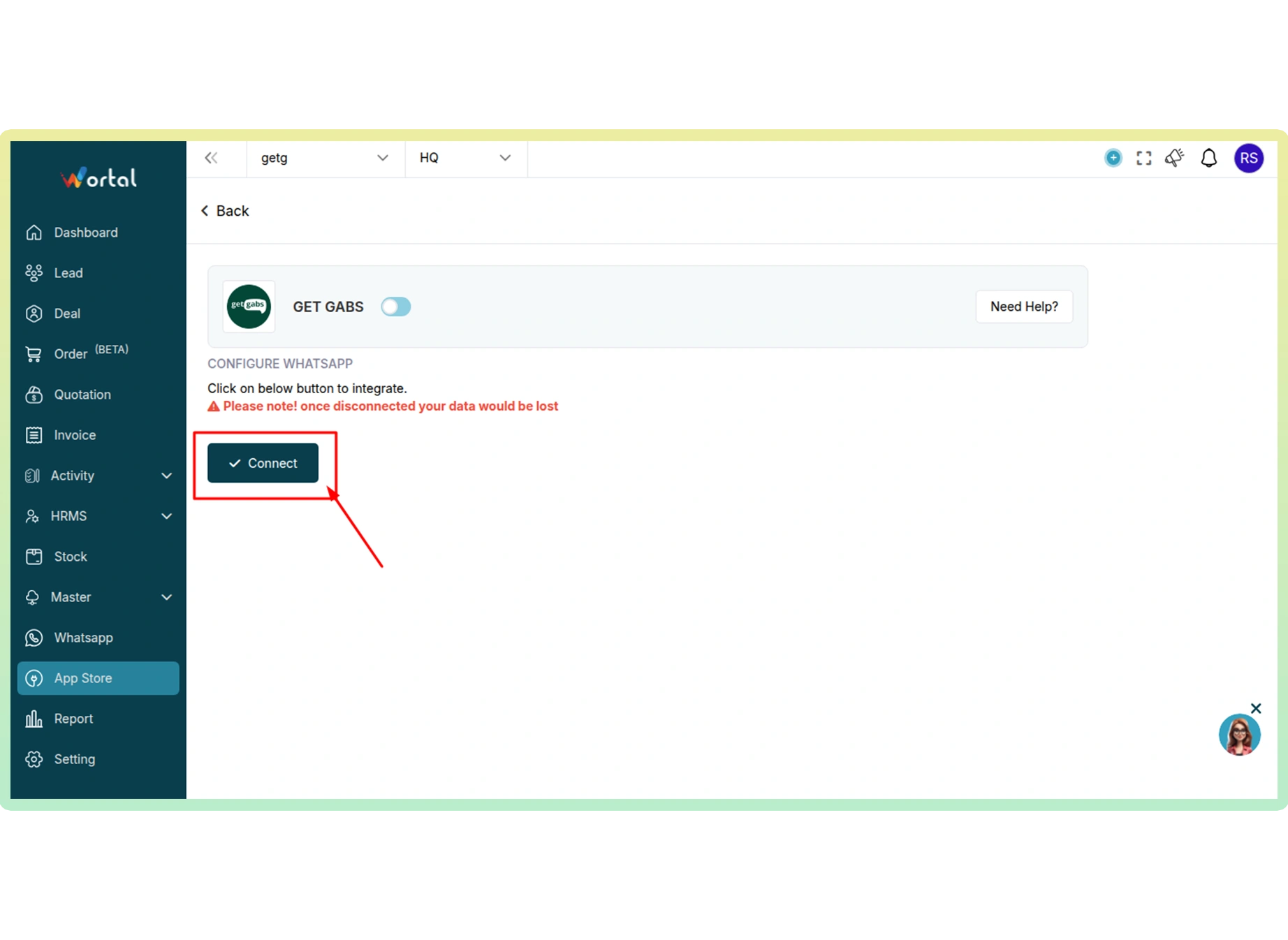
Click on the “WhatsApp” tab and "Login with Facebook" to begin and finish the Meta onboarding process.
Enquiry Now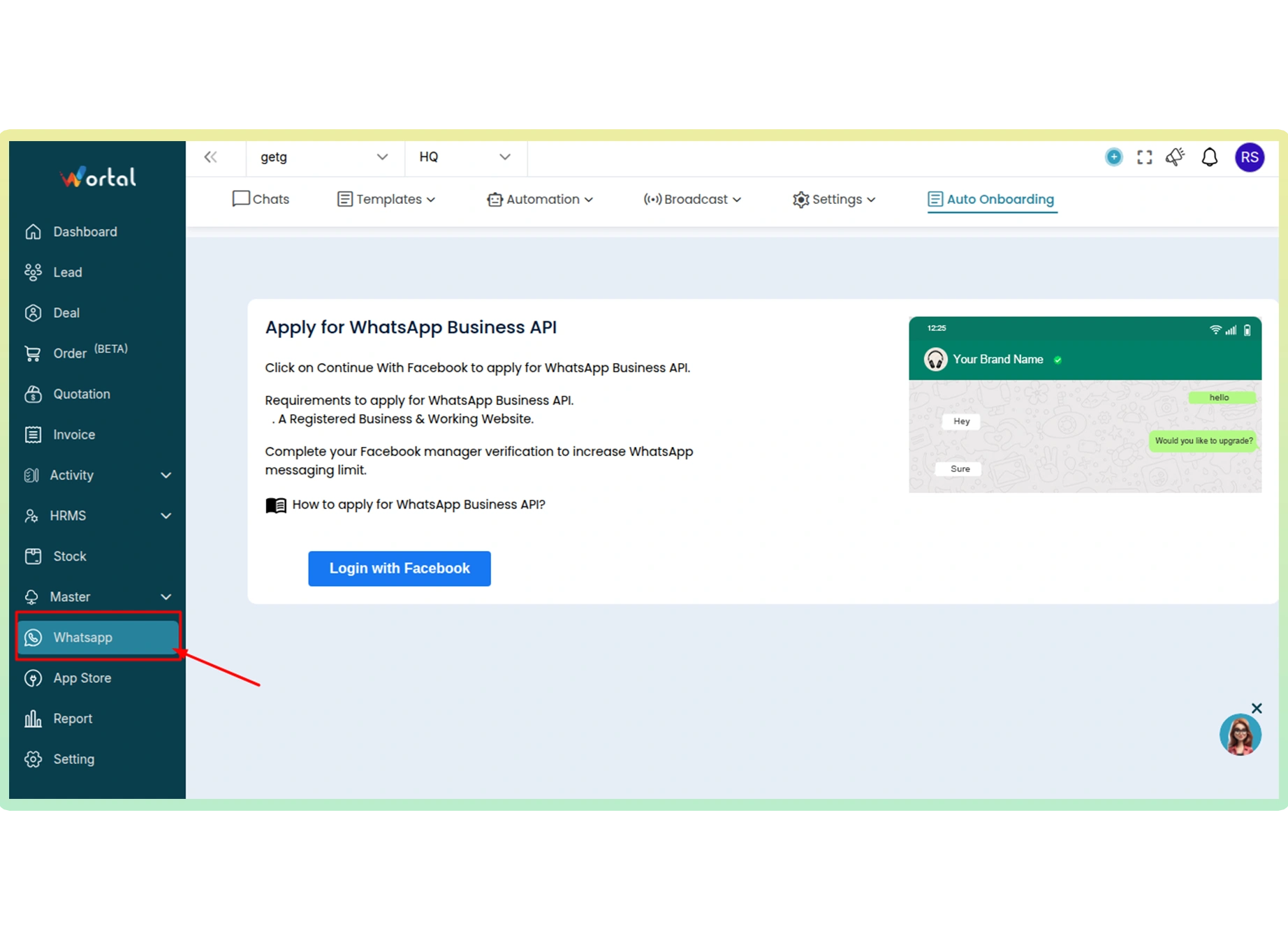
Once onboarding is done, you can begin managing WhatsApp conversations directly from your Wortal CRM dashboard.
Enquiry Now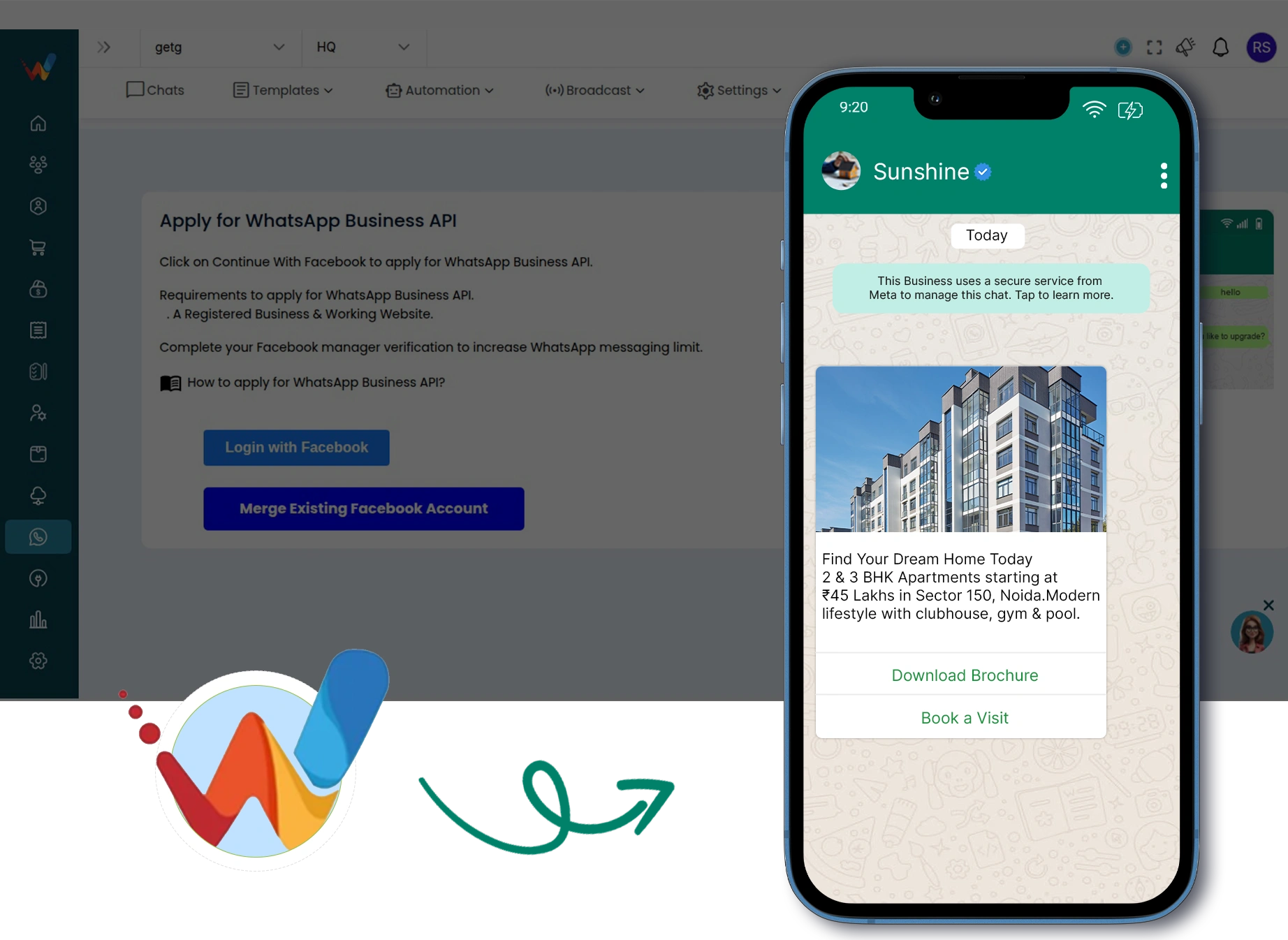
Discover all supported integrations and connect WhatsApp with your favorite platforms to automate conversations and workflows.
 Shopify
 WooCommerce
 Gotab
Gotab
 Wortal
 Shiprocket
 Zoho
Zoho
 Google Sheet
 n8n
Shopify
WooCommerce
Gotab
Wortal
Shiprocket
Zoho
Google Sheet
n8n
Shopify
WooCommerce
Gotab
Wortal
Shiprocket
Zoho
Google Sheet
n8n
Shopify
WooCommerce
Gotab
Wortal
Shiprocket
Zoho
Google Sheet
n8n
n8n
Shopify
WooCommerce
Gotab
Wortal
Shiprocket
Zoho
Google Sheet
n8n
Shopify
WooCommerce
Gotab
Wortal
Shiprocket
Zoho
Google Sheet
n8n
Shopify
WooCommerce
Gotab
Wortal
Shiprocket
Zoho
Google Sheet
n8n
See how WhatsApp Business Platform helps businesses boost marketing, streamline sales, and improve customer support.
Reach customers instantly with high-engagement broadcasts and personalized offers.
Learn moreConvert chats into sales with automated workflows, lead management, and fast follow-ups.
Learn moreProvide fast, reliable customer support with instant replies and automated ticket management.
Learn more
Official Meta Partner
Connect, engage, and convert faster with powerful automation, broadcasting, and real-time chat.


No setup cost
No markup charges

