

Too Long? Read This First
- What it is: Automating COD order confirmation on WhatsApp helps businesses instantly verify Cash on Delivery orders via interactive buttons, cut fake orders, and lower RTO.
- How it works: The order triggers a WhatsApp API workflow instantly, sends a pre-approved template with order details, and updates your store the moment the customer taps Confirm or Cancel.
- Setup: Get WhatsApp Business API access, connect your store, get your templates Meta-approved, set the COD trigger, and test before going live.
- Best practices: Send the confirmation within minutes, keep messages short, limit follow-ups to one reminder, and always give customers an easy way to cancel.
- Get started: Getgabs lets you send automated WhatsApp COD confirmations without any technical skills, with instant access to WhatsApp API, no-code setup, integration support, and instant template approval.
How to automate COD order confirmation on WhatsApp is a question each e-commerce brand starts asking once return-to-origin (RTO) costs eat into margins. Cash on Delivery (COD) continues to account for a massive share of online purchases in markets like India.
But it also comes with a major challenge. Customers may place accidental orders, enter incorrect details, change their minds, or simply refuse the package at delivery. The result? Higher Return-to-Origin (RTO) rates, increased shipping costs, and wasted operational efforts.
Industry data shows that COD orders experience RTO rates roughly between 20% – 40%. That’s where automated WhatsApp COD order confirmation comes in. Instead of calling each customer or hoping to see an email, you can verify COD orders the moment they are placed.
As per studies, it cuts down COD return-to-origin rates by 25% to 50% by validating buyer intent and fixing address errors. In this guide, we will explore how to automate COD verification on WhatsApp to improve customer experience and reduce operational costs.
What Is COD Order Confirmation on WhatsApp?
COD order confirmation on WhatsApp is an automated verification process where businesses send an instant message to buyers right after they place a COD order. Instead of calling each customer manually, businesses use the Meta WhatsApp API to ask them to confirm or cancel with just a tap.
It eliminates the need for customers to make phone calls, reduces verification delays, and makes the process more convenient. Plus, WhatsApp for e-commerce helps brands verify genuine buyers, filter out risky orders, and enhance delivery success rates.
As opposed to SMS or email, WhatsApp offers a more engaging experience with quick replies, call-to-action buttons, automated follow-ups, and real-time conversations. With increasing order volume, COD confirmation on WhatsApp is more easily scalable, cost-efficient, and helps prevent revenue loss from delivery failures.
How Does WhatsApp COD Order Confirmation Work?
Here’s how WhatsApp COD confirmation works from order to shipment:
- Customer Places a COD Order: A shopper checks out and places a Cash on Delivery order on Shopify, WooCommerce, or any store platform.
- Automatic Trigger: A store’s backend automatically detects the new COD order. The system triggers a WhatsApp confirmation workflow using the WhatsApp API.
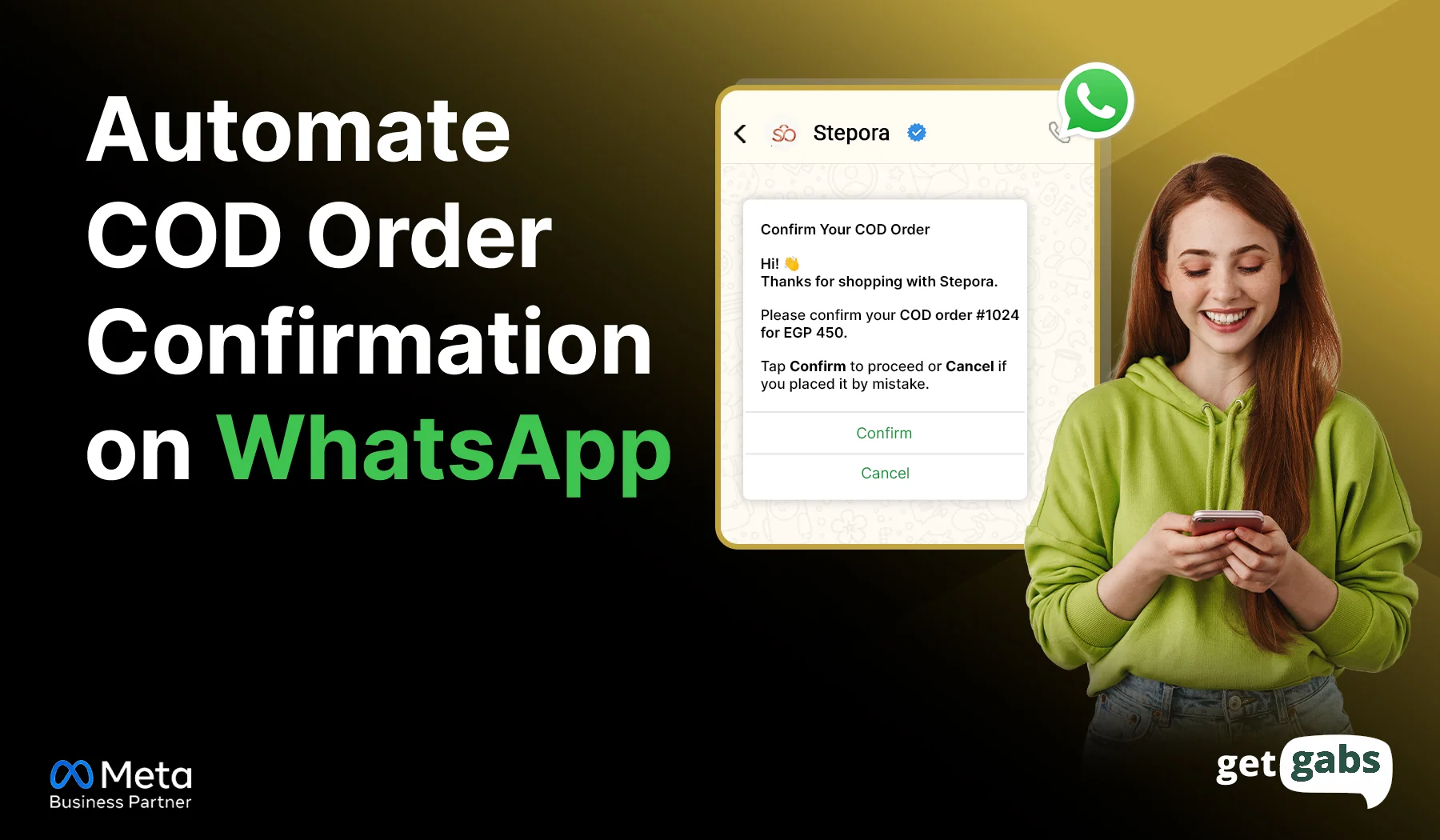
- WhatsApp Confirmation Message Is Sent: A customer receives an automated COD confirmation message with a pre-approved WhatsApp template. It generally includes the order number and product name, total COD amount, and delivery address.
- Customer Action: The message also includes quick-reply or call-to-action buttons to let the buyer confirm, update, or cancel the order within the chat.
- Automated Status Update: If the user taps on Confirm, the order is automatically marked as “COD confirmed”. Or if they cancel or do not respond within the set window, the system tags or holds the order for review.
- Verified Orders Move to Fulfilment: Only confirmed orders get packed and shipped. This small check not only saves time but also saves you from paying to ship something that nobody actually wants.
What Should a COD Confirmation Message Include?
| Element | Why It Matters |
| Order ID & Product Details | Helps customers quickly identify the order and verify that the correct items were purchased. |
| Order Amount | Shows the exact COD amount payable at delivery, reducing confusion and disputes later. |
| Delivery Address | Gives customers a chance to review and correct any address mistakes before the order is shipped. |
| Expected Delivery Date | Sets clear expectations and helps build trust by letting customers know when their order will arrive. |
| Confirm/Cancel Buttons | Makes it easy for customers to respond with a single tap, leading to faster verification and higher response rates. |
| Brand Name | Reassures customers that the message is genuine and sent by the business they ordered from. |
| Support Option | Allows customers to ask questions or request changes if they face any issues with the order. |
Tip: Keep your COD confirmation message short and focused. Customers should be able to review the order and take action within 30 seconds.
How to Automate WhatsApp COD Confirmation for Your Store
Follow this step-by-step process to send an automated COD order confirmation workflow on WhatsApp:
Step 1: Get API Access and Verify Your Business
Start by applying for WhatsApp Business API via a Meta-approved provider like Getgabs. Now, verify your business in Meta Business Manager to send automated COD notifications at scale.
If you’re new to the API, learn how to apply for the WhatsApp Business API with just a few simple steps.
Step 2: Connect Your Store
Link your WhatsApp API to your CRM, e-commerce tools like Shopify, WooCommerce, or a platform of your choice. The integration lets your store automatically detect COD orders and trigger a verification workflow.
Step 3: Create and Approve Your Templates
Create and apply WhatsApp Business API message templates for COD order confirmation notifications.
Submit a utility template for COD verification, including variables like customer name, order ID, order value, and quick-reply buttons like “Confirm Order” or “Cancel Order” for Meta approval.
Step 4: Set Up the COD Trigger
Define the event triggers that should fire the COD verification message when the customer instantly selects Cash on Delivery during checkout.
Then map out customer data fields such as name, order ID, item list, and total order value. Once mapped, the system will automatically fill them.
Step 6: Update Order Status Automatically
When a customer confirms or cancels the order, the system automatically updates the order status in your store or CRM. You can also set automated reminders for customers who do not respond right away.
Learn how to send automated WhatsApp messages.
Step 7: Track Performance and Optimize
Run a test using your own mobile number to check that the CTA button functions and the automation workflow works correctly. Run an automation campaign and monitor key metrics like response and delivery rate.
Bonus Step: Take automation one step ahead by connecting your shipping partner.
- Getgabs’ Shiprocket integration moves confirmed orders straight to the shipping queue
- No manual handoff needed between confirmation and pickup.
Not sure which provider fits your business? Compare your options in this breakdown of the best WhatsApp automation tools before you commit.
Benefits of WhatsApp COD Confirmation Automation
A simple automated WhatsApp COD confirmation can make a big impact on your business operations. Below are the key benefits of implementing it:
1. Higher Confirmation Rates
Customers are likely to reply to WhatsApp messages compared to traditional channels like email or SMS. It helps brands confirm more orders in less time and reduces unverified shipments.
2. Improved Delivery Success Rates
Verified orders are more likely to be accepted at delivery. By filtering out fake or accidental buyers before dispatch, businesses can lower delivery failure and Return-to-Origin (RTO) rates.
3. Faster Order Verification
WhatsApp API automation lets brands verify COD orders within seconds of checkout. Customers can confirm or cancel an order with just a single tap, which helps businesses process nd ship orders faster.
4. Reduce Customer Support Costs
Automating COD confirmation reduces the need for confirmation calls. Brands can even deploy WhatsApp AI chatbots to answer common customer queries and offer 24/7 customer support.
5. Better Customer Engagement
With WhatsApp API, you can create and send interactive message templates with quick reply buttons for a more engaging experience. Customers can confirm or cancel, and update their order without leaving the app.
6. Real-Time Database Sync
The moment a customer taps “Confirm” or “Cancel”, your inventory and order status update automatically. It eliminates the need to manually update order status.
7. Easy Scalability During Sales Seasons
Orders can double to hundreds or thousands during big sales, and keeping up manually is not possible. Using WhatsApp broadcast, businesses can send thousands of confirmation messages in a personalized manner at once without falling behind.
WhatsApp COD Order Confirmation Message Templates
Template 1: COD Order Confirmation
Use this template message just after a customer places a COD order.
Example: “Hey [Customer Name], thank you for your order #[Order ID]. Order Amount: ₹[Amount]. Please confirm your order so we can start processing it.
Buttons: [Confirm Order] [Cancel Order]”
Template 2: Delivery Address Verification
Use this template to verify your customer’s delivery details before shipping.
Example: “Hey [Customer Name], we are packing your order #[OrderID] containing items [item name]. Delivery Address: [Address]. Please verify your shipping address for this order by tapping: [Address Correct] [Update Address].”
Template 3: COD Confirmation Reminder
Send a COD confirmation reminder if the customer has not responded to the first message.
Example: “Hi [Customer Name], we are still waiting for confirmation of your COD order #[order ID] with amount Rs.[Amount]. Please confirm your order to avoid cancellation.
Buttons: [Confirm Order] [Cancel Order]”
Template 5: Order Successfully Confirmed
Send this message once the customer confirms a COD order.
Example: “Hey [Customer Name], thank you for confirming your order #[Order ID]. Your order is being processed and will be shipped within 3-4 days.”
Best Practices to Confirm COD Orders Without Annoying Customers
- Send the Confirmation Message Immediately: Trigger the first WhatsApp conversation message within 1-5 minutes of COD order placement. Customers are more likely to respond when purchase intent is still fresh.
- Space out follow-ups: Sending too many follow-ups can feel spammy. If the customer doesn’t respond, send a reminder after 12 to 18 hours.
- Use One-Tap Action Buttons: Add CTA buttons like Confirm Order, Cancel Order, or Update to enable customers to respond with just a tap.
- Keep messages short and clear: Avoid long messages. Keep messages short and variable, like customer name, order ID, amount, and delivery address, to scan.
- Give Customers a Way to Get Help: Add a support option to let customers ask questions or make changes before shipping. It prevents cancellation later. You can automate customer support by deploying an AI chatbot using Getgab’s drag-and-drop chatbot builder.
Conclusion
Automating COD order confirmation on WhatsApp is not a nice-to-have feature. It is one of the most effective methods to reduce fake orders, lower RTO rates, and improve delivery success without adding any extra manual work. Instead of relying on buried emails or unread SMS, businesses can verify buyer intent instantly via WhatsApp. It ensures only genuine orders move to fulfillment. It not only saves shipping costs and time but also helps deliver a more convenient experience for customers. Plus, it results in better operational efficiency, higher order acceptance rates, and better customer satisfaction.
If you’re ready to automate COD confirmation but don’t know where to get started. Getgabs is the best WhatsApp automation tool built on the official Meta API to get started. The platform offers everything from instant template approval support, Shopify API integration, AI-powered automation, shipping and e-commerce tool integration, and WhatsApp broadcasting to scale with you. So what are you waiting for? Connect with Getgabs, a WhatsApp automation platform, today to verify orders faster and scale your operation with confidence.
Frequently Asked Questions
Yes. Platforms like Getgabs enable businesses to seamlessly integrate with tools like Shopify and WooCommerce, deploy an AI chatbot for 24/7 support, and automate COD order confirmation without writing a single line of code.