

Too Long? Read This First
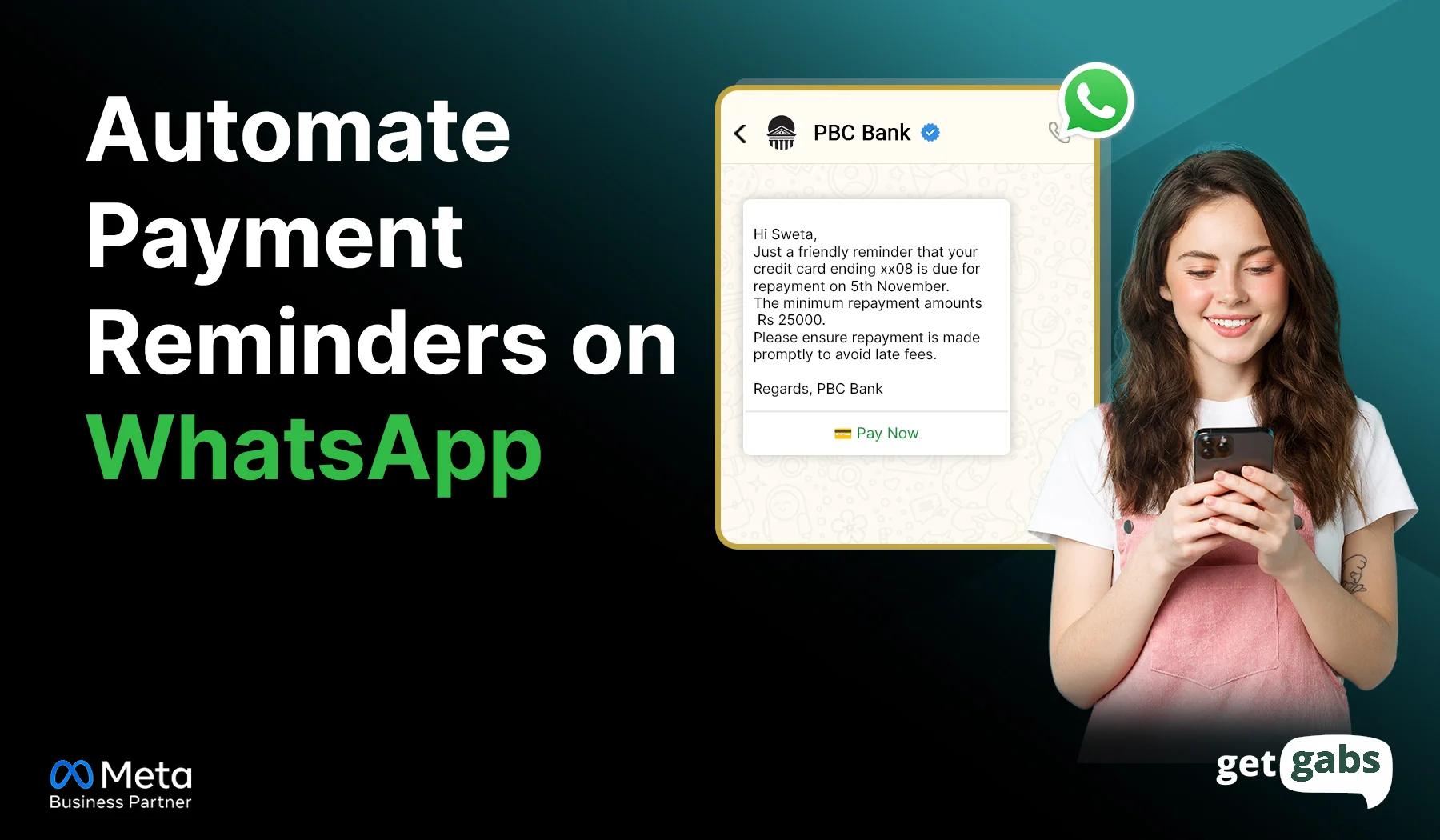
- Automating payment reminders on WhatsApp means system-triggered messages about due or upcoming payments sent automatically via WhatsApp Business API.
- The process works in five simple stages: invoice created → reminder triggered → WhatsApp message sent → customer pays via in-chat link → workflow stops on its own.
- To send automated payment reminders via WhatsApp, you need to get WhatsApp Business API access, connect your billing/CRM tools, create approved templates, set reminder triggers, and add payment links.
- The best results come from the right reminder sequence, like a friendly nudge before the due date, a direct reminder on the due date, and follow-ups if payment is still pending (Day -3 to Day +14).
- With a WhatsApp automation platform like Getgabs, businesses can get instant access to the API at 0% markup, connect billing software, create approved templates, and send real-time automated payment reminders without any coding.
Tired of chasing unpaid invoices manually? You can automate payment reminders on WhatsApp and get paid without lifting a finger.
Now imagine that it’s the 28th of the month. You’re looking at your spreadsheet of unpaid invoices, typing the same reminder five times today and sending it out manually, one by one. It not only causes delayed payments but also impacts cash flow and business operations.
This is where automated WhatsApp payment reminders come in. It eliminates manual follow-up, improves cash flow, and helps brands get paid faster without the uncomfortable collection call.
In this guide, we will learn how to automate payment reminders on WhatsApp, build reminder workflows, integrate payment systems, and boost collection rates.
What Does It Mean to Automate Payment Reminders on WhatsApp?
Automating payment reminders on WhatsApp means system-triggered messages about due or upcoming payments sent automatically via the Meta Business API. Once it is set up, invoice reminders, due alerts, overdue payment notifications, and payment confirmation messages go out on their own at the right time. No manual typing needed.
Here’s how it’s different from what most businesses do today:
- Manual Reminders: You open WhatsApp → find the contact → type a message → hit send → one customer at a time.
- Automated Reminders: The system checks due dates or upcoming payments, picks the right template, fills in the customer’s name and amount, and sends it automatically.
Instead of manually tracking each invoice, brands can create automated workflows to handle the entire payment reminder process and even schedule WhatsApp messages to reach contacts at the exact right time. WhatsApp automation helps brands reduce manual collection work, improve payment collection rates, prevent missed follow-ups, and speed up cash flow.
Why Should Businesses Automate Payment Reminders on WhatsApp?
Automating payment reminders helps businesses collect payments faster, reduce manual work, and ensure customers receive timely follow-ups.
| Benefit | How It Helps |
| Reduce Manual Follow-Ups | Automatically sends reminders without needing the team to manually follow up with each customer |
| Improve Cash Flow | Send timely reminders to encourage on-time payments and reduce the number of overdue invoices. |
| Never Miss a Reminder | Every customer receives reminders based on predefined schedules and payment status. |
| Save Team Time | Eliminates repetitive collection tasks so employees can focus on more valuable work. |
| Better Customer Experience | Customers receive timely reminders with payment links, due amount, and due date, making payments quick and convenient. |
| Lower Collection Costs | Reduces the need for manual calls, emails, and follow-up efforts. |
| Scale With Business Growth | Whether you manage 100 invoices or 10,000, automation handles reminders without extra workload. |
| Increase Payment Completion Rates | Consistent reminders help customers remember and complete payments on time. |
To unlock these benefits, businesses need access to the official WhatsApp API to connect billing systems, CRM, payment gateways, and automate reminders. Explore our guide on the best WhatsApp Business API providers to find the best fit for your business.
How Payment Reminder Automation Works on WhatsApp
Here’s what happens behind the scenes once your automation is all set up:
- Invoice Gets Created: The invoice is generated with a due date, amount, and customer details in your billing or accounting software like Tally, Zoho Books, QuickBooks, or any ERP system.
- Automatic Trigger: The system automatically schedules or triggers payment reminders based on the invoice due date. Reminders can be sent before, on, or after the due date (If payment is still pending) to ensure timely updates.
- WhatsApp Reminder Messages Are Sent: A customer receives an automated payment reminder using a pre-approved WhatsApp template. It mainly includes payment details, invoice information, and a secure payment link.
- Customer Action: The message includes a direct payment link or call-to-action buttons to let buyers complete payments within the chat. No more app switching or waiting on hold.
- Workflow Stops Automatically: Once payment is marked complete, the system stops sending reminders for that invoice.
How to Automate Payment Reminders on WhatsApp (Step-by-Step Guide)
Step 1: Get WhatsApp Business API Access
Start by connecting with an official WhatsApp Business API provider like Getgabs to get instant access to the API. Now, verify your business in Meta Business Manager to send automated delivery notifications at scale.
If you’re new to the API, you can also read this guide on how to apply for the WhatsApp Business API.
Step 2: Connect Your Billing or CRM Software
Link your WhatsApp API to your CRM, e-commerce tools like Shopify, and billing software like Zoho Books, Tally, Razorpay, and QuickBooks. The integration lets your store automatically detect who owns what and when.
Step 3: Create & Approve Reminder Templates
Create and apply WhatsApp Business API message templates for different payment stages, such as upcoming due dates, overdue payments, and payment confirmations. Add CTA buttons and submit them for Meta approval.
Step 4: Set Up the Reminder Triggers
Configure the timing logic that determines when each reminder fires. A well-structured sequence typically includes a pre-due reminder, a due-date notification, and one or two follow-ups if the invoice remains unpaid.
Then map out the phone number, name, and invoice details from your spreadsheet fields directly into your approved WhatsApp template.
Step 6: Enable Automation Rules
Set rules that automatically send reminders, escalate overdue payments, and stop follow-ups once payment is received. You can also send automated WhatsApp messages for customers who do not respond right away.
Step 7: Test & Go Live
Before going live, test an order and walk through each stage. Make sure all your workflows and payment links are working correctly. Once it looks right, switch the workflow on for real customers.
Not sure which provider fits your business? Compare your options in this breakdown of the best WhatsApp automation tools before you commit.
Best Payment Reminder Sequence for Higher Collections
Sending the right reminder at the right time is very important. WhatsApp API automation lets brands set up drip campaigns to follow up with customers at every stage of the payment cycle.
Recommended Payment Reminder Timeline:
| Timeline | Goal | Message Type |
| Day -3 | Prepare customer for payment | Friendly Reminder |
| Day 0 | Collect payment on time | Due Date Reminder |
| Day +3 | Follow up on missed payment | Overdue Reminder |
| Day +7 | Increase urgency | Urgent Payment Reminder |
| Day +14 | Final collection attempt | Final Notice |
A well-planned reminder sequence helps customers remember upcoming payments without getting annoyed with too many follow-ups.
WhatsApp Payment Reminder Templates You Can Use
Below are some ready-to-use delivery notification templates for each stage of payment:
1. Upcoming Payment Reminder
Send a friendly payment reminder 2-3 days early to avoid delayed payment.
Example: “Hi [Customer Name], this is a gentle reminder that your payment of ₹[Amount] for invoice #[invoice number] is due on [Date]. Please pay before the due date to avoid late fees. Pay here: [Link].
2. Due Date Reminder
Send this reminder on the payment due date for timely payments with direct payment links.
Example: “Hi [Customer Name], your Payment of ₹[Amount] for Invoice #[Invoice No.] is due today. Please complete the payment today to avoid any delay. Tap the button below to pay now: [Pay Now]. Thank You.”
3. Overdue Payment Reminder
Send this reminder 2-3 days after the due date if payment is not received yet,
Example: “Hey [Customer Name], our records show that your payment for ₹[Amount] for invoice #[Invoice Number], due on [Due Date], is still pending. Please complete the payment at your earliest convenience using the link [Payment Link]. If already paid, please ignore the message.”
4. Final Payment Notice
Send this reminder 10-14 days after the due date if your earlier reminder left unanswered.
Example: “Hi [Customer Name], this is a final reminder regarding your pending payment of ₹[Amount] for invoice #[Invoice Number]. Please complete it today to avoid service interruptions.”
Getgabs offers a free WhatsApp Message Template generator to help businesses create templates within seconds instead of spending hours writing them manually.
How Getgabs Helps You Automate Payment Reminders on WhatsApp
Getgabs is a Meta-approved WhatsApp Business API solution that helps businesses automate the entire payment collection process without technical heavy lifting. With Getgabs, you can:
- Instant Access to API: The Getgabs automation platform helps brands start with the WhatsApp API with instant setup and onboarding support.
- Automated Reminder Workflow: An automation builder to schedule reminders before due dates, on due dates, and after missed payments.
- Seamless Integration: Connect WhatsApp with your workflows directly with CRMs, third-party tools like Shopify, and billing software to automatically sync customer data and payment records.
- Faster Payment Collection: Reduce payment delays by allowing customers to pay directly using in-chat WhatsApp Payments.
- AI-Powered Customer Support: Deploy a no-code AI chatbot to o answer payment-related queries, share invoices, and assist customers 24/7.
- Real-Time Analytics: Track message delivery, read rates, responses, and payment performance to identify which reminders drive the highest payment completion rates.
- WhatsApp broadcasting: Send hundreds or thousands of personalized payment reminders at once via bulk WhatsApp broadcast.
The best? There are no markup charges on Meta costs and zero set-up fees. Getgabs makes it easy to automate payment reminders and improve cash flow without increasing operational overhead.
Conclusion
Automate payment reminders on WhatsApp is one of the most effective ways to eliminate manual follow-ups, reduce payment delays, and create a smoother collection process.
Instead of recording invoices in spreadsheets and sending reminders one by one, you can send timely payment alerts, overdue notices, and confirmation messages without lifting a finger. A well-planned automation workflow not just saves time but also improves cash flow and minimizes missed payments.
Be it a subscription agency, e-commerce store, or healthcare industry, automated reminders make payments faster and more efficient.
The key to its success is to set up the right triggers, use approved templates, and stick to compliance. If you’re ready to get started, Getgabs offers you everything that you need to automate payment reminders on WhatsApp. Built on the official Meta API, it helps connect billing tools, automate workflows, get template approval fast, and collect payments within WhatsApp chat.
Want to automate more customer communications? Read our guides on How to Automate COD Order Confirmation on WhatsApp and How to Automate Delivery Notifications on WhatsApp next.
Frequently Asked Questions
Yes. WhatsApp API providers like Getgabs offer a no-code automation builder for businesses to send automated reminders and create workflows without writing a single line of code.