

Too Long? Read This First
- Click-to-WhatsApp on Google Ads is a feature that enables businesses to add a direct WhatsApp button to their Google Ads through a message asset.
- It helps businesses capture leads faster, lower cost per lead, offer a better customer experience, automate customer conversations, and improve conversion rate.
- Google Click-to-WhatsApp ads catch people who are already searching for you, while Meta CTWA ads build interest while people scroll. Many businesses run both.
- To set up Google Click-to-WhatsApp ads, you need to meet Google's requirements and then add a message asset in a few steps, write a clear starter message, and submit it for approval.
- There's no fixed price, just your usual ad cost plus messaging costs if you use the API.
- As your campaign grows, platforms like Getgabs offer your official WhatsApp Business API access and help manage leads using a shared team inbox, chatbot, and built-in automation.
Setting up Click-to-WhatsApp on Google Ads is one of the most effective ways to connect high-intent searchers directly on WhatsApp. Many businesses spend heavily on Google Ads yet still lose leads due to slow landing pages or long forms.
Click-to-WhatsApp Ads remove this friction. Instead of filling out a form, users can start a conversation with a business directly on WhatsApp with just a tap on Google Ads. It helps businesses drive higher lead generation and more personalized real-time engagement.
In fact, 73.3% of consumers prefer communicating with brands via messaging, and 72.4% are more likely to buy from brands that offer messaging. This conversational marketing strategy works great for local businesses, e-commerce stores, healthcare, automotive, and real estate.
With Getgabs, businesses can run Click-to-WhatsApp on Google Ads to turn search ad clicks into WhatsApp conversations and capture high-intent leads.
In this guide, we will learn how to set up Google Click-to-WhatsApp ads, track results, control costs, and automate replies to drive more sales.
What Is Click to WhatsApp on Google Ads?
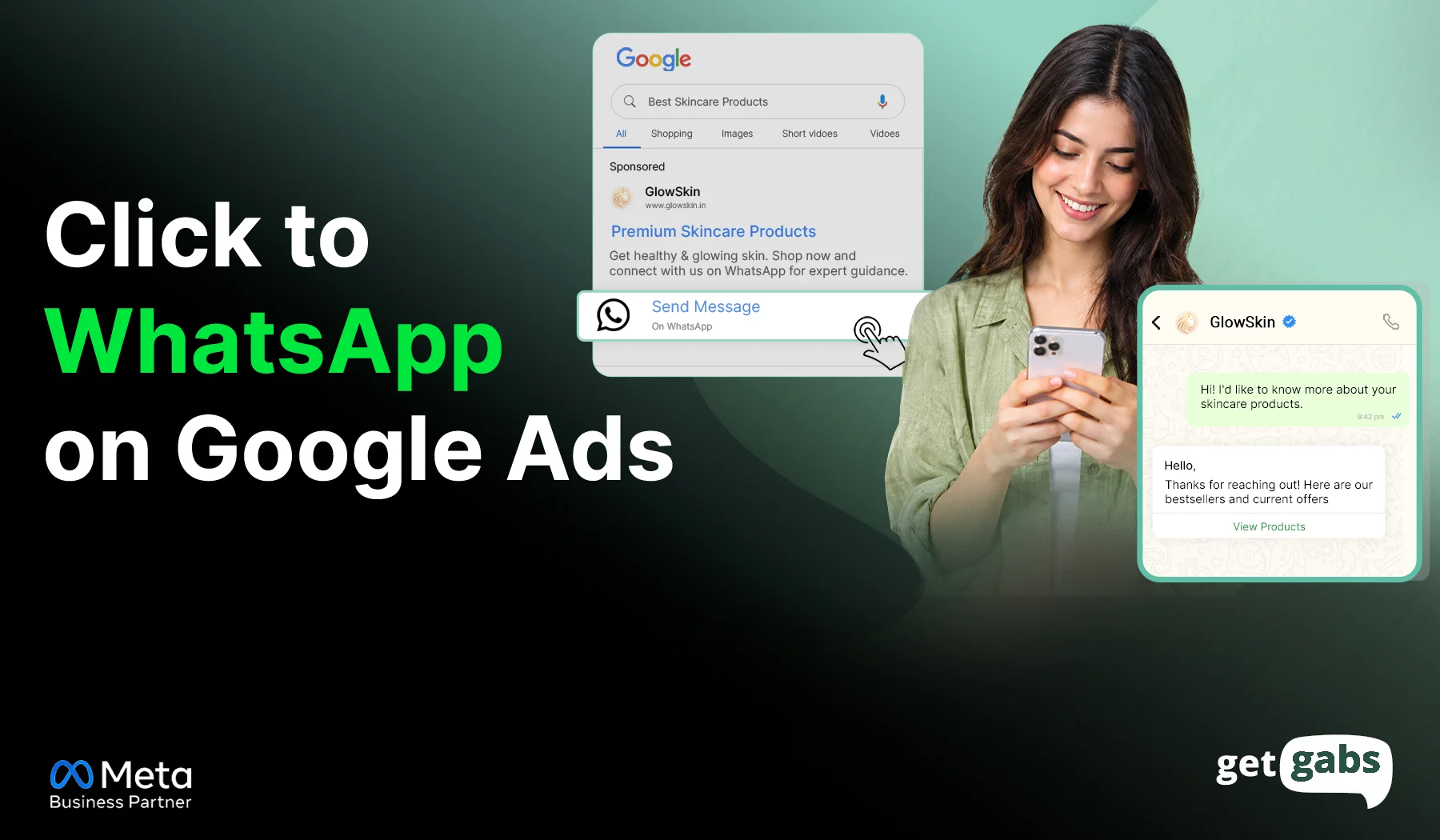
Click to WhatsApp on Google Ads is a feature that enables businesses to add a direct WhatsApp message button to their Google Ads through a message asset. The moment someone taps the button, a WhatsApp chat window opens with a pre-filled message to let users start a conversation or ask questions with businesses.
It makes it easier for potential customers to connect without waiting for a callback or filling out a form. Here’s how it works:
Someone searches on Google and sees your ad:
Path 1: If the user clicks the headline, they go directly to your website.
Path 2: If they tap the message button (User clicks the ad → WhatsApp chat window opens with a pre-filled message → conversation starts)
This feature works well with Search campaigns and Performance Max campaigns. However, the WhatsApp message button does not show alongside call assets or lead form assets.
Plus, Google currently offers this feature in beta, which means it may not be available in every ad account yet.
Why Run Click-to-WhatsApp on Google Ads?
Many businesses invest in Google Ads to attract potential customers. But the thing is, long forms and phone calls often slow down the process and lead to lost leads.
Here’s why Google Click-to-WhatsApp ads stand as a beneficial solution for businesses:
- Faster Lead Capture: It enables potential customers to ask questions and receive an instant response from businesses with just a single click while buying intent is still fresh.
- Higher Conversion Rates: Eliminates the need for users to load slow landing pages or find a phone number, which leads to fewer steps and more conversions.
- Better Customer Experience: No need to download any extra app. Users can get instant answers to their queries on the app that they already use every day, making the buying journey smoother.
- Lower cost per lead: CTWA ads lower your cost per lead by removing traditional conversion friction and capturing verified contact data instantly.
- Automate Customer Conversations: Businesses can deploy an AI chatbot, connect WhatsApp with their CRM system, and use WhatsApp automation tools to qualify leads, schedule appointments, send catalogs, and follow up with leads automatically.
Google Click to WhatsApp Ads vs Meta Click to WhatsApp Ads
Both Google Ads and Meta Ads help brands generate qualified leads, improve sales, and drive measurable business growth by targeting users at different stages of their buying journey. But both of them work differently. They both open a WhatsApp chat window, but the difference is user intent.
Let’s see a side-by-side comparison of both ad formats to get a clearer picture:
| Factors | Google Ads | Meta Ads |
| Where the ad shows | Google Search and Performance Max placements | Facebook, Instagram, Messenger, and WhatsApp Status |
| User mindset | Searching: “I need this now” | Scrolling: “That looks interesting” |
| Setup tool | Google Ads (message asset) | Meta Ads Manager |
| Ad formats | Text ads with a message button | Image, video, and carousel ads with a WhatsApp button |
| Targeting | People who type keywords linked to your service | People chosen by interests, age, location, and behavior |
| Free messaging window | Meta lists only its own click-to-WhatsApp ads and Page buttons for this benefit | A 72-hour free window opens when you reply within 24 hours. |
| Best for | Ready-to-buy leads: bookings, quotes, price checks | Brand awareness, new products, and visual offers |
When to Use Each?
- Use Google click-to-WhatsApp ads when people are actively searching for your product or services. Your ad automatically reaches them when they need it and search for that keyword.
- Use Meta click-to-WhatsApp ads when you want to reach people while they are browsing on Facebook or Instagram and encourage them to start a conversation.
Learn how to create Click-to-WhatsApp ads to run them on Facebook or Instagram.
Can You Run Both?
Yes, businesses can run both formats of ads. Google ads catch people when they search for your related product or service, while Meta ads build interest. To learn more in detail, go through our complete guide on WhatsApp Ads.
What Do You Need Before You Set Up a Click-to-WhatsApp Google Ad?
Message assets are still in beta. This means not every account can use them yet. Here’s all you need before you get started with Google Click-to-WhatsApp ads:
| Requirement | Why it matters |
| Clean policy history | Google looks for advertisers with a good record of following its ad policies. |
| Eligible vertical | Sensitive areas, such as campaigns and elections, can’t use message assets. |
| Advertiser verification | You need to complete Google’s Advertiser verification program. New advertisers may see limited impressions at first, until they build up positive user interactions. |
| Active WhatsApp Business number | You add a working WhatsApp Business number and pick its country when you set up the message asset. |
| Country check | Message ads show on Android phones worldwide, but on iPhones only in some countries. |
Review Google’s official requirements for message assets before starting.
Where Can People See Click to WhatsApp Ads on Google?
Click to WhatsApp ads on Google Ads are widely available globally on Android. But on iPhones, they are restricted to selected countries like India, Malaysia, Saudi Arabia, and Singapore. Check out Google’s complete country list before you plan to create yours.
How to Set Up Click to WhatsApp on Google Ads: Step-by-Step
Once your account is eligible for message assets, you can easily add a WhatsApp button to your Google Ads. Below is a step-by-step procedure you need to follow:
Step 1: Sign In to Your Google Ads Account
Go to Google Ads and sign in to your account. Make sure your account meets all of Google’s eligibility requirements for message assets.
Step 2: Navigate to the Assets Menu
In the left-hand side menu, tap on Ads & assets and select “Assets”. Now tap on the blue “+” button to create a new asset.
Step 3: Create a Message Asset
From the list of available assets, select Message asset. Here, you get the option to attach the asset at one of the three levels:
- Account level: Applies to all eligible campaigns.
- Campaign level: Applies only to a specific campaign.
- Ad group level: Applies to a specific ad group.
For most businesses running a Google Click-to-WhatsApp ad, the campaign level is the best option. Why? Because it gives better control over targeting and performance.
Step 4: Add Your WhatsApp Details
Choose WhatsApp as your messaging platform. After that, pick your country and enter your active WhatsApp Business number.
Step 5: Write the Starter Message and CTA
Add a call-to-action (CTA) like Chat Now or Get Quote. Once done, write a starter or welcome message that will appear automatically when users land on the WhatsApp chat window.
Example: “Hey, I’d like to know more about your service or product.”
Step 5: Save and Review
Check all the details carefully and tap the “Save” button to submit your message asset for Google review. Once it gets approved, the WhatsApp button will appear alongside your search ads.
How Much Do Click-to-WhatsApp Ads Cost on Google Ads?
There is no fixed cost for Click-to-WhatsApp Google Ads. It mainly operates on a dynamic pay-per-click (PPC) auction system. This means you pay Google each time someone taps or clicks on your ads. The cost varies based on industry, keyword demand, targeted location, and campaign type.
Here are the two cost factors to plan for:
| Cost | What it covers | What sets the price |
| Ad cost | Clicks on your ad or message button | Your bid goal, keywords, and competition, same as any Google Ads campaign |
| Messaging cost | Chats sent through the WhatsApp Business API | Your provider’s rates and how many messages you send each month |
The free WhatsApp Business app works fine for limited chats per day. But once your business needs to handle a large volume of leads, the WhatsApp Business API is worth the cost.
For businesses looking to scale WhatsApp lead generation, Getgabs combines the WhatsApp Business API, chatbot, shared team inbox, and WhatsApp automation features to help convert more ad clicks into customers.
Best Practices for Click-to-WhatsApp on Google Ads
A simple or slight change can make a huge change in the performance of your click-to-WhatsApp on Google Ads:
Before You Launch
- Target keywords that show users are actively looking for your product or service.
- Keep “WhatsApp” out of your headline, as a headline click will take users to your website, not the chat window.
- Match your starter message with your ad. For example, if your ad is about “sports equipment”, don’t start with generic words like ” How can I help you instead, be specific.
- Always add action-driven phrases like Chat now or Book an appointment.
After You Launch
- Use a WhatsApp Chatbot to send an instant reply to leads. The faster the reply is, the better the chances of converting leads into customers.
- Regularly review the keywords triggering your ads and remove the irrelevant searches.
- Measure how many WhatsApp chats turn into qualified leads, bookings, or sales,
- Experiment with headlines, descriptions, and CTAs one by one to know what’s working for your brand better and have better impressions.
Conclusion
Setting up a Click-to-WhatsApp on Google Ads offers businesses an effective way to turn Google search into a real conversation. Instead of sending users to slow landing pages or filling out long forms, this feature lets users connect with businesses in real-time on WhatsApp with just a tap.
This not only speeds up the customer buying journey but also makes it more convenient. The key to generating high-quality leads while keeping advertising costs under budget is to get the right keywords, create compelling ad copy, optimize your campaign regularly, and offer instant responses.
Whether you’re running an e-commerce store, real estate, healthcare, or automotive, Google Click to WhatsApp ads help you engage with customers when their buying intent is at its highest. But as your campaigns grow, managing conversations efficiently becomes equally important as generating leads.
That’s where platforms like Getgabs help you. Being an official Meta WhatsApp API partner, the platform offers a wide variety of features like a shared team inbox, AI chatbot, lead management tools, and built-in automation to turn more ad clicks into sales and drive better results from your Google Ads investment.
Frequently Asked Questions
Yes. Google Ads offers message assets that let businesses add a WhatsApp button to their Search or Performance Max ads. When someone taps the ad, they will directly land in the WhatsApp chat window where they can start a conversation with businesses.