

Too Long? Read This First
- WhatsApp API Integration with ERP Software is a tool that connects your business’s ERP system with the WhatsApp Business API to automate updates, stock alerts, invoices, payment reminders, and improve customer communication.
- It works on triggers. When an event happens in the ERP, like a customer placing an order or a stock status change, the integration detects the changes and sends a WhatsApp message automatically.
- The key benefits include faster customer updates, less manual work, on-time payment follow-ups, and better team coordination.
- Setup takes six steps that include picking one task, setting up the WhatsApp Business API, getting templates approved, connecting the integration layer, setting up webhooks, then testing and going live.
- Choose a solution based on ERP compatibility, integration method, automation triggers, two-way chat, security, and pricing. Getgabs offers the official WhatsApp Business API for custom ERP builds. Your team can also answer replies in a shared team inbox.
WhatsApp API Integration with ERP Software helps businesses connect their ERP system with WhatsApp to automate communications and sync data in real time. But what actually happens when customers wait for order updates or payment reminders get missed?
Your ERP might have all the data, but sharing it manually takes a lot of time and effort. That’s where integrating the WhatsApp API with your ERP comes in to solve the issue. It allows brands to send an automated order confirmation, shipping updates, stock alerts, and invoice reminders directly to customers on the most-used messaging channel.
With Getgabs, you can integrate WhatsApp Business API with your existing ERP to automate order updates, stock alerts, reduce manual workload, and deliver instant answers to customer queries.
In this guide, you will learn what ERP WhatsApp API Integration Software is, key features, benefits, setup, and how to choose the right solution that fits your business.
What Is WhatsApp API Integration with ERP Software?
WhatsApp API Integration with ERP Software is a tool that connects your business’s ERP system with the WhatsApp Business API to automate updates and improve customer communication. An ERP system manages business data, such as orders, stock, invoices, and payments. By connecting it to WhatsApp through an API, connector, or integration tool, businesses can share information without sending every message manually.
ERP WhatsApp API Integration Software helps businesses:
- Send order confirmations, dispatch updates, and delivery notifications automatically.
- Send invoices, payment reminders, and payment confirmations.
- Notify teams about low stock, delayed orders, and pending approvals.
- Share quotations, invoices, and other business documents with customers.
- Answer common customer questions using automated chatbots.
- Route customer queries to the right team for faster support.
- Follow up on unpaid invoices, pending orders, and incomplete transactions.
- Track message delivery, customer replies, and communication performance.
Instead of switching between systems or sending every update manually, businesses can use ERP WhatsApp Integration to automate everyday tasks, keep teams aligned, and deliver a smoother customer experience.
How Does WhatsApp API Integration with ERP Software Work?
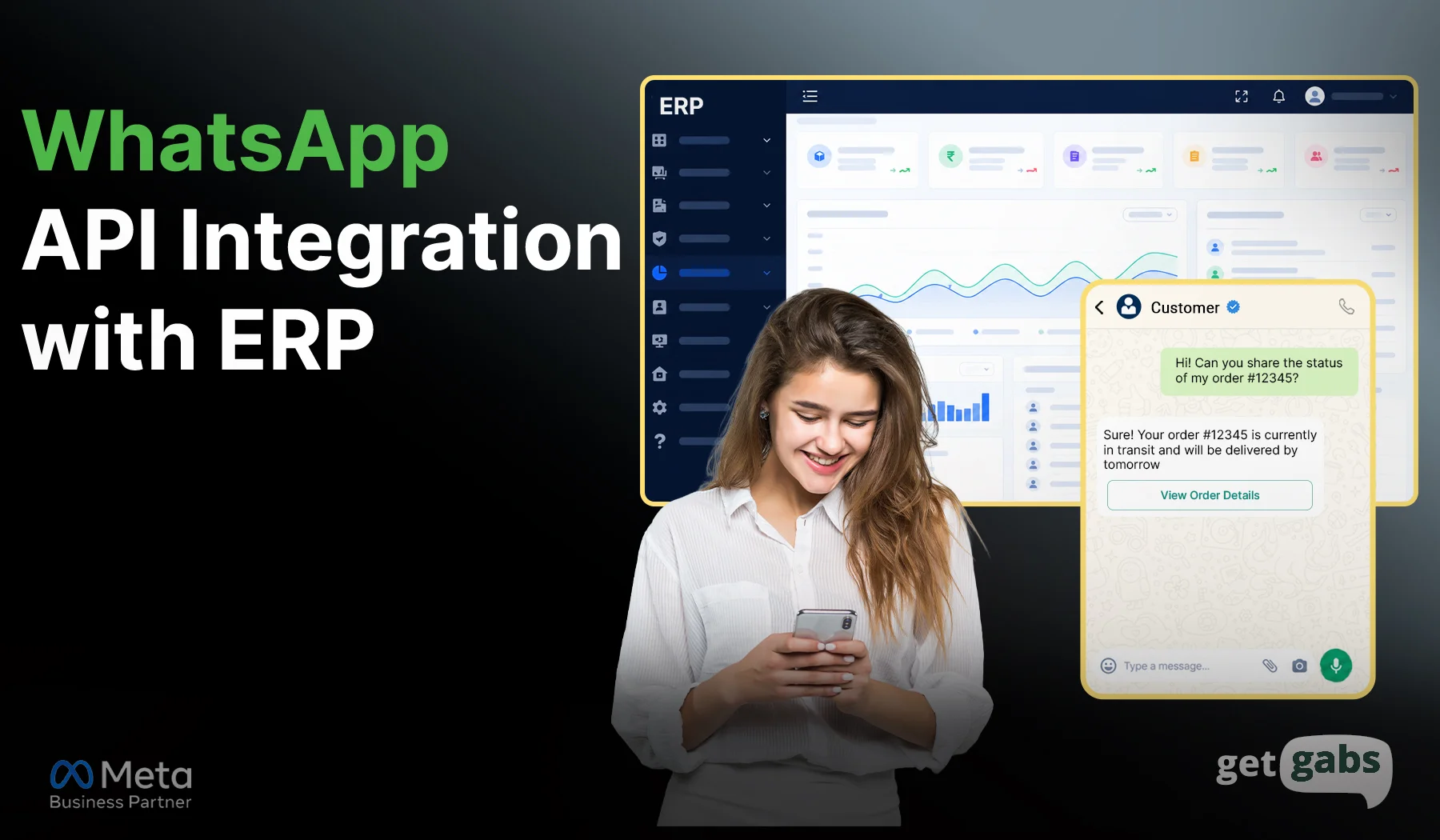
ERP WhatsApp Integration software connects your business data with customer conversations. It allows your ERP system to trigger WhatsApp messages when an order, payment, or stock status changes. This reduces manual work and keeps customers informed at every step.
Here’s how the process works:
- An event happens in the ERP: A customer places an order, makes a payment, or an item runs low on stock.
- The integration detects the change: An API, connector, or integration tool picks up the event and collects the required details.
- WhatsApp sends the message: The system uses the relevant information to send an order confirmation, invoice, payment reminder, or stock alert.
- The customer replies: If the customer asks a question, the message can be routed to a chatbot or the right support team.
- The team tracks the result: Staff can review the conversation and update records when the integration supports two-way data syncing.
Example: When an order status changes to “Shipped” in your ERP, the integration triggers a WhatsApp message with the tracking details. The customer gets an update without your team having to send it manually.
Benefits of WhatsApp ERP Integration Software
WhatsApp ERP Integration software helps businesses connect daily operations with faster customer communication. Instead of managing every update manually, teams can automate routine tasks and keep important information moving.
- Faster customer updates: Send order confirmations, shipping alerts, and delivery updates automatically.
- Less manual work: Reduce repetitive calls, messages, and data entry so staff can focus on important tasks.
- Better payment follow-ups: Send invoice notifications, payment reminders, and payment confirmations based on ERP records.
- Improved team coordination: Route customer questions to the right team and make conversations easier to manage.
- Timely business alerts: Notify staff about low stock, delayed orders, pending approvals, and overdue payments.
The results depend on how well the integration fits your business needs. Accurate ERP data, clear workflows, and customer consent are important for smooth and reliable communication.
Key Features to Look for in WhatsApp ERP Integration Software
Choosing the right WhatsApp ERP integration software helps you automate tasks, manage conversations, and share updates with less effort. Look for these useful features:
| Feature | What it does |
| Automated notifications | Sends order confirmations, dispatch alerts, and delivery updates. |
| Invoice and payment alerts | Reminds customers about unpaid invoices and upcoming due dates. |
| Two-way messaging | Lets customers reply, ask questions, and request help. |
| AI chatbot | Answers common questions and collects customer details automatically. |
| Shared team inbox | Helps staff manage customer conversations in one place. |
| ERP data sync | Connects relevant customer, order, and payment records between systems. |
| Analytics and reporting | Tracks message delivery, customer replies, and workflow results. |
| Access controls | Helps limit access to business data based on team roles. |
Before choosing a solution, check whether these features are built in, available through an integration, or require custom development. The right choice depends on your ERP system, business needs, and budget.
Use Cases of Integrating WhatsApp API with ERP Software
Your ERP already knows what is happening in your business. ERP WhatsApp API Integration Software lets it share that news with the right person, in the app they check most. Here are seven ways businesses use it.
1. Automated Order Updates and Tracking
Customers hate waiting without news. When a customer places an order, the ERP can trigger a WhatsApp confirmation with order details or a PDF invoice. Once the order ships, the customer receives a tracking link and delivery updates without needing to contact support.
Template Example: “Hey [Customer Name]. Your order #5021 is on its way. Track it here: [link]”
Why it helps: Customers stop calling to ask where their order is.
2. Instant Invoice and Payment Checks
Customers often ask, “How much do I owe?” The integration can retrieve the relevant details from the accounting system and share the invoice, outstanding balance, or payment due date, subject to proper access checks.
Why it helps: Customers get answers instantly, and your accounts team gets time back.
3. Overdue payment reminders
Chasing payments by phone is slow and awkward. Instead, the ERP tracks invoice due dates and enables the brand to send automated WhatsApp payment reminders to customers before or after the due date. This helps finance teams reduce manual follow-ups and keep customers informed about pending payments.
Example: “Hi Riya, invoice #1042 is due tomorrow. Please pay it today to avoid any extra charges. Pay here: [link].”
Why it helps: Reminders go out on time, every time, without anyone having to remember.
4. Real-Time Inventory Alerts
When stock falls below a set level, the ERP can alert warehouse or purchasing teams on WhatsApp. Teams can also receive updates about delayed shipments, stock shortages, and items that need to be reordered.
Why it helps: Problems reach the right person before they turn into missed orders.
5. Faster Document Approvals
Businesses can share quotations, design proofs, purchase orders, and other documents through WhatsApp. When the client replies “Approved,” the job status updates in the ERP and production gets the signal.
Why it helps: No more waiting days for an email reply.
6. Messages Directly From the ERP
Staff can send automated invoices on WhatsApp along with dispatch notes, reports, and order updates from their ERP workflow via an integrated WhatsApp tool. This reduces the need to switch between applications and helps keep business communication linked to the right records.
Why it helps: You get a clear audit trail of what was sent, when, and to whom.
7. Automatic Lead Capture and Assignment
Say a customer clicks a Click-to-WhatsApp ad and asks about a product. The integration creates a CRM lead with their name, product interest, and quantity. It then assigns the lead to the right sales rep through a WhatsApp sales CRM.
Why it helps: No lead gets lost in a busy inbox.
See it in action: one overdue invoice
ERP: Invoice #1042 passes its due date. Reminder fires.
WhatsApp: “Hi Riya, invoice #1042 for ₹18,500 was due yesterday. Pay here: [link].”
Customer: “Paid just now.”
ERP: Status changes to Paid.
WhatsApp: “Thank you! Your receipt is attached.”
No call. No email. No staff time.
How to Integrate WhatsApp with an ERP System: Step by Step
You can connect WhatsApp to your ERP in six steps. Start with one task, like invoice reminders. Add more once it works.
Step 1: Pick your task and map your data
Decide what should trigger a message. Good starters are an order confirmation, a new invoice, low stock, or a payment reminder. Then match your ERP fields to the message. These usually include the customer’s phone number, name, and order ID.
Step 2: Set up your WhatsApp Business API account
Choose an official WhatsApp Business API provider like Getgabs.
- Register and verify your business with Meta.
- Add your phone number through a Meta-approved provider (BSP) or Meta’s Cloud API.
- Get your API keys and endpoint details.
Explore some of the best WhatsApp Business API providers to find the right fit for you.
Step 3: Create message templates
Any promotional or marketing messaging you send requires Meta approval. Create and submit a WhatsApp Message template to get it approved. Add placeholders like name or order number and make sure they match your ERP data structure.
Step 4: Build or Connect the Integration Layer
Pick the option that fits your ERP:
- Built-in setting: Some ERPs, like Zoho, have a WhatsApp option. Switch it on and enter your Getgabs API details.
- Middleware: Tools like Zapier or Make link your ERP events to the Getgabs API without much code. This suits open-source ERPs like ERPNext.
- Custom code: Your developer connects your ERP to the Getgabs API for complex setups or high volumes.
Need more detail? Read our WhatsApp Business API integration guide.
Step 5: Set up webhooks for replies
A webhook sends customer replies, delivery updates, and read receipts back to your ERP. Without it, you can send messages, but you will not see what comes back. Route replies to a shared team inbox so the right person answers.
Step 6: Test & Go live
Trigger a test event in your ERP, such as saving an invoice or approving a payment. Check three things:
- The message arrives
- The name, amount, and date are right
- Replies reach your team
Fix any errors first. Our list of WhatsApp API error codes helps here. Then roll out to real customers and watch delivery for the first week.
How to Choose the Right ERP WhatsApp API Integration Software?
The wrong tool can leave you with broken messages and unhappy customers. Ask these six questions first:
| Factor | Ask this | Green flag |
| ERP compatibility | Does it work with my ERP and modules? | Your exact ERP is supported |
| Integration method | Is there a ready-made connector? | Setup without custom code |
| Automation | Can orders, invoices, and stock changes trigger messages? | Event-based triggers |
| Two-way chat | Do replies reach the right record and team? | Replies are linked to the customer |
| Security | Are access controls and audit logs included? | Role-based access and message logs |
| Pricing and support | What are the setup, plan, and message costs? | Clear pricing and real human support |
Which path fits you?
- Small business: a ready-made integration is faster and cheaper.
- Complex ERP setup: Custom development gives you more control.
Getgabs works for both. As an Official Meta Business Partner, it offers the official WhatsApp Business API for custom ERP builds. Your team can also answer replies in a shared team inbox.
Conclusion
WhatsApp API Integration with ERP Software helps businesses turn the data already sitting in your ERP into timely customer updates and smoother daily operations. Rather than chasing payments, answering “Where is my order?” calls, or sending updates by hand, your ERP can do the work for you. Customers get faster answers. Your team saves time. Everyone stays in the loop. Nothing slips through the cracks.
The best way to begin is simple. Pick one task, like invoice reminders or order alerts. Test it, fix any gaps, and then add more workflows as you grow. Small wins build trust fast.
Ready to connect your ERP with WhatsApp? Getgabs is an Official Meta WhatsApp Business API provider that gives you the official Meta API, a shared team inbox, and expert support to go live with confidence. Start with Getgabs today and let your ERP talk to your customers.
Frequently Asked Questions
Yes, WhatsApp can be integrated with ERP systems like SAP, Oracle, and Odoo using APIs, middleware, or custom connectors. The setup depends on your ERP version and available integration options.